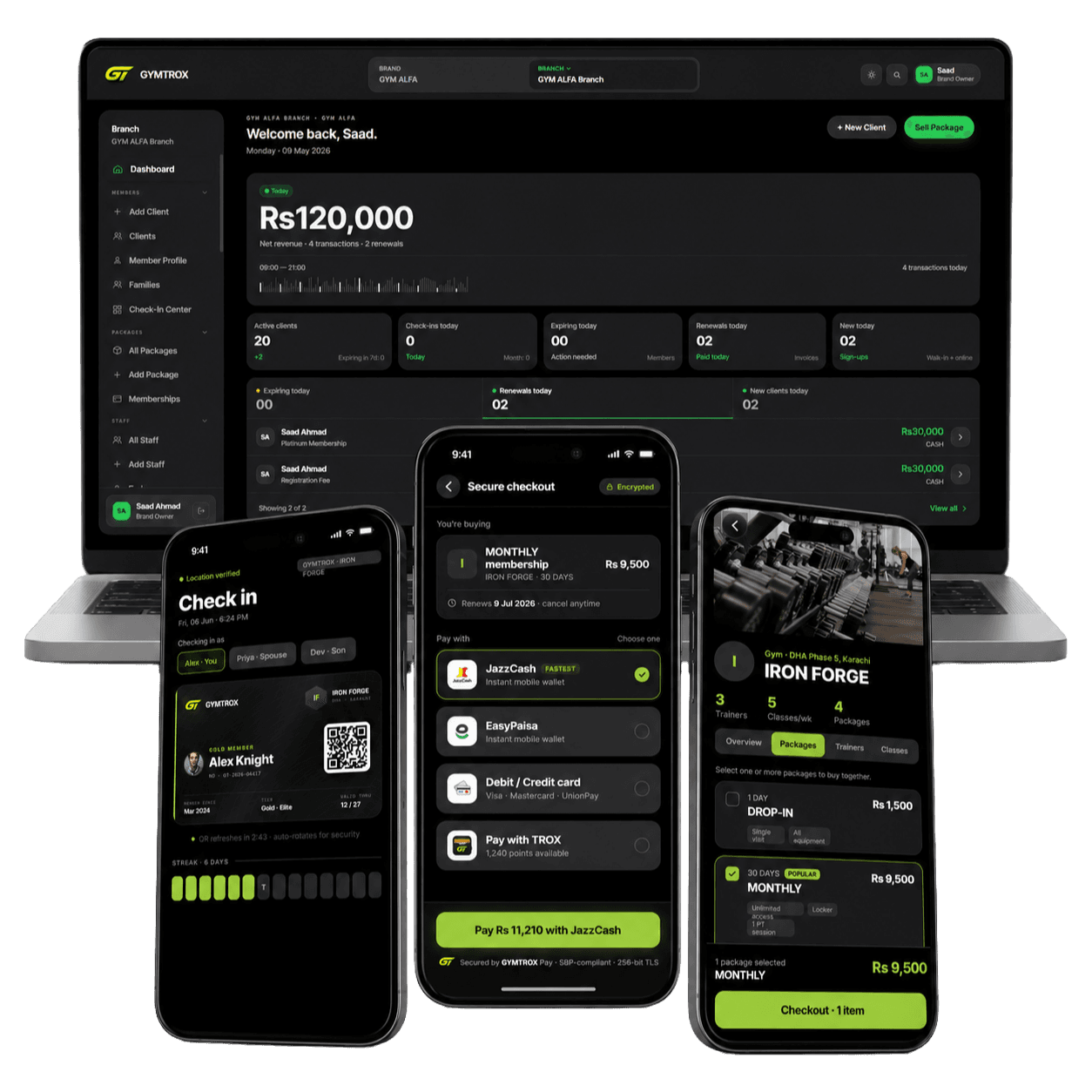
 In use with GYMTROX
Pioneer Time face attendance, installed and connected.
Pioneer PT-1000 and PT-20000 terminals with face, fingerprint and RFID card, fitted at your door or turnstile. For gyms, GYMTROX syncs members to Pioneer terminals through Pioneer’s cloud. For offices, we set up Pioneer’s attendance software.
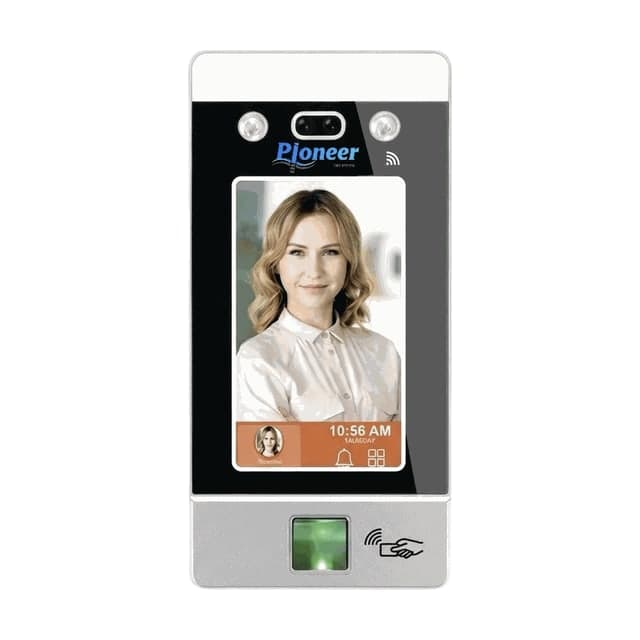
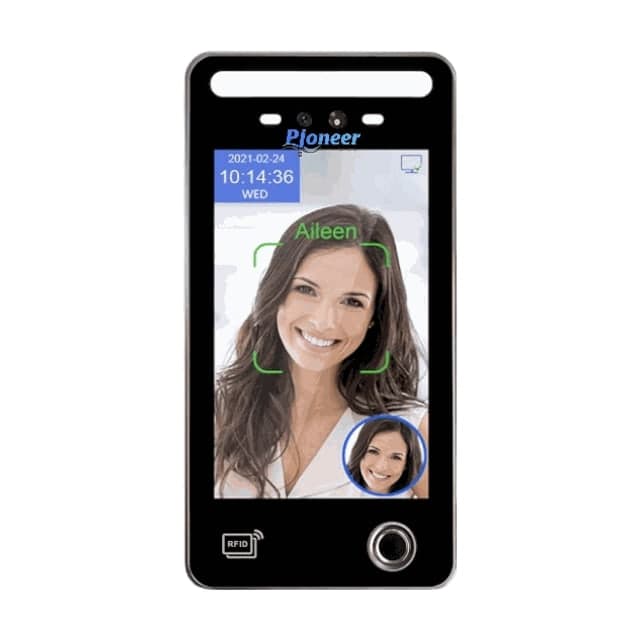
Pioneer Time readers we supply
Both terminals take a face, a fingerprint and an RFID card. Ask on WhatsApp for the full datasheet of either model.
PT-1000
- Face
- Fingerprint
- RFID card
Best for: Doors and turnstiles: face, fingerprint and RFID card in one terminal
PT-20000
- Face
- Fingerprint
- RFID card
Best for: A large face screen for busy entrances, with fingerprint and RFID backup
How Pioneer readers connect to GYMTROX
Pioneer terminals live on Pioneer’s own cloud. GYMTROX connects to that cloud rather than to the terminal, so there is nothing to open on your router and nothing to install at the site.
Connected through Pioneer’s cloud
GYMTROX syncs with Pioneer’s cloud every minute: members out to the terminal, entries back as visits.
Removals sent at once
When access is removed, GYMTROX sends it straight away instead of waiting for the next minute’s sync.
Rejoining is instant
A lapsed member is disabled on the terminal, not deleted, so their face and fingerprint stay put. When they renew they are re-enabled, with no re-enrolment.
Enrol at each terminal
Pioneer keeps biometrics on the terminal itself, so a face or fingerprint is captured at each terminal a member uses. They are not copied between terminals.
Clock drift corrected
Some Pioneer terminals stamp entries hours ahead and have no time-zone setting. GYMTROX learns a terminal’s offset and corrects every entry it pulls.
Keeps working offline
The terminal admits the people stored on it. Entries upload to Pioneer’s cloud, and on to GYMTROX, when it reconnects.
A Pioneer reader on a door or a turnstile
The reader is the same either way. What holds the entrance decides how many people get through per scan.
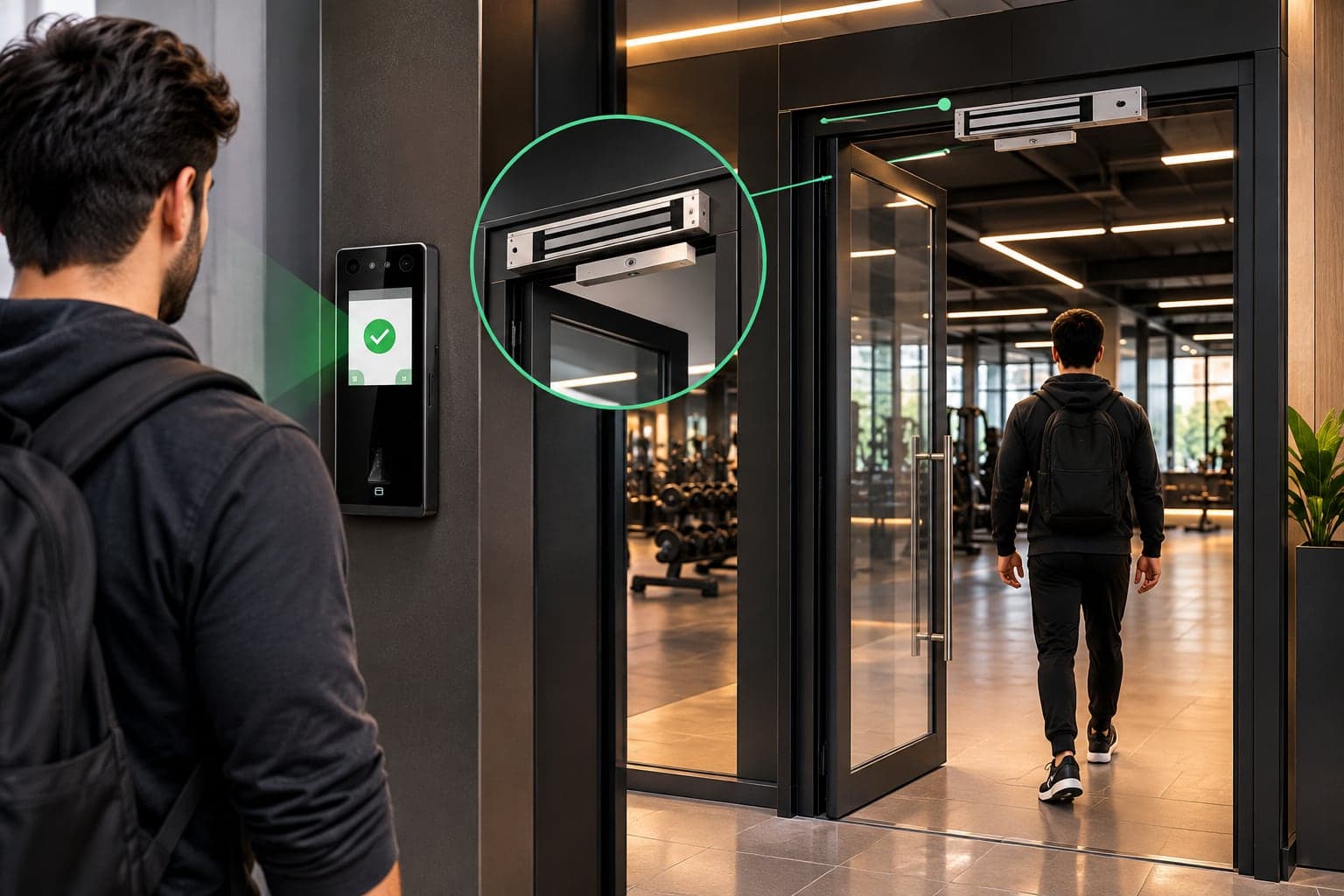
On a door, with a magnetic lock
- Glass, wood or metal doors: offices, clinics, studios, inner rooms.
- Exit button inside; the lock releases if power is cut.
- The simplest install: one reader, one lock, one power supply.
On a tripod turnstile
- One person per scan: every entry is counted, and a lent card can’t bring in two.
- Busy entrances: gyms, schools, factory gates, office lobbies.
- Add an exit reader for a time out as well as a time in.
Pioneer access control packages
Every package is the hardware, the installation and the software set-up together. Prices aren’t listed because every site is different: send your doors and headcount on WhatsApp for an itemised quote.
Single Door
Best for: One entrance: an office, a clinic, a studio or a ladies section
- Face or fingerprint reader
- Magnetic lock with bracket, sized for your door
- 12 V power supply with backup battery
- Exit button for walking out
- Cabling and installation
- Software set-up and staff training
Turnstile Entry
Best for: Busy entrances where every person must be counted
- Entry reader, plus an exit reader for time-out
- Tripod turnstile: one person per scan
- Reader-to-turnstile wiring and installation
- Entry and exit directions set on each reader
- Software set-up and staff training
Complete Facility
Best for: Large gyms, offices, schools and buildings
- Turnstile at the main entrance
- Magnetic locks on inner doors: staff room, ladies section, stores
- A reader on every controlled door
- RFID cards matched to your readers
- Entry, exit and section doors on one system
- Priority support after handover
Installation day, step by step
One visit for most single-door and single-turnstile sites. Larger sites are planned door by door.
- 01
Site survey
Doors, cable routes, power and internet checked.
- 02
Mount and wire
Reader, lock or turnstile, exit button and power.
- 03
Enrol people
Faces, fingerprints and cards captured at the reader.
- 04
Connect and test
We register the terminal (model PTDGTX) and confirm entries flow through Pioneer’s cloud.
- 05
Handover and training
Your staff run it themselves from day one.
Requirements and honest limits
What a Pioneer site needs, and what no reader can do, so nothing surprises you after installation.
What the site needs
- Internet at the terminal, so it stays connected to Pioneer’s cloud. No static IP or port forwarding.
- The terminal registered in GYMTROX with model code PTDGTX. We do this at installation.
- Mains power with a backup battery for the terminal and the lock.
Honest limits
- Faces and fingerprints are enrolled at each terminal; they do not copy between Pioneer terminals.
- If someone deletes a member directly on the terminal, re-enrol them there. A GYMTROX re-sync does not restore a deleted record yet.
- The terminal opens the lock or turnstile itself. GYMTROX decides who is enabled on it; it does not open doors remotely.
- Changes reach an offline terminal when it reconnects to Pioneer’s cloud.
Pioneer for offices: Pioneer attendance software
For offices, schools and factories we set up Pioneer’s own attendance software with your staff, shifts and reports. No GYMTROX account is needed.
Supplied and installed across Pakistan
We deliver and install Pioneer readers across Pakistan: survey, wiring, enrolment and software set-up by one team. Send your city on WhatsApp and we’ll confirm the installation date.
- Lahore
- Karachi
- Islamabad
- Rawalpindi
- Faisalabad
- Multan
- Peshawar
- Sargodha
- Gujranwala
- Sialkot
Outside Pakistan?
We set up the software remotely and guide your local installer through wiring and enrolment. Hardware supply is available on request.
Pioneer Time access control FAQ
Which Pioneer Time terminals do you supply?
+
We supply the Pioneer Time PT-1000 and PT-20000 face recognition terminals, both with a fingerprint sensor and an RFID card reader, together with magnetic locks, turnstiles, exit buttons, power supplies and cards. Ask on WhatsApp for the full datasheet of either model.
Does GYMTROX work with Pioneer Time terminals?
+
Yes. GYMTROX connects to Pioneer terminals through Pioneer’s cloud: members are synced to the terminal and entries come back as visits every minute, and removals are sent immediately. The integration is already in use on GYMTROX.
What happens when a member’s plan ends on a Pioneer terminal?
+
GYMTROX disables the member on the terminal rather than deleting them, so the door stays shut but their face and fingerprint remain stored. When they renew they are re-enabled and walk straight in, with no re-enrolment.
Do members have to enrol on every Pioneer terminal?
+
Yes. Pioneer keeps faces and fingerprints on the terminal itself, so each terminal a member uses needs its own enrolment. Their name and ID are synced to every terminal automatically.
Why are the entry times on my Pioneer terminal hours off?
+
Some Pioneer terminals add their own time offset and have no time-zone setting. GYMTROX sets the terminal clock, learns any remaining offset from fresh entries and corrects the time on every entry it pulls.
Do I need a static IP for a Pioneer terminal?
+
No. The terminal connects to Pioneer’s cloud and GYMTROX syncs with that cloud, so there is no port forwarding at your site. The terminal only needs internet.
Can an office use Pioneer terminals without GYMTROX?
+
Yes. For offices, schools and factories we set up Pioneer’s own attendance software with your staff and shifts. GYMTROX membership sync is for gyms and fitness clubs.
How much does a Pioneer access control system cost?
+
It depends on the terminal, the number of doors, whether you need a turnstile or magnetic locks, cabling and the software. Send your doors, headcount and city on WhatsApp and we will reply with an itemised quote.
Tell us your doors. We’ll send the setup.
How many doors or turnstiles, how many people, which city. That’s all we need for an itemised quote on WhatsApp.
ZKTeco, Hikvision and Pioneer are trademarks of their respective owners. GYMTROX is an independent supplier and integrator and is not affiliated with or endorsed by them.